Some content could not load.
We could not load files from our content delivery networks (CDN).
Your network may be blocking access. Ask your IT to allow loading from: .
Your network may be blocking access. Ask your IT to allow loading from: .

PixelPAD 2D - introduction
Python
PixelPAD 2D uses Python to program projects, and applications.
Engine
In order to make projects a lot of work must be completed first,
so instead of having to make everything from the ground up each time
Computer Scientists use something called an “engine”.
The engine handles how what you made appears for the user, and dictates
what you can do. PixelPAD2D is one of our major engines on PixelPAD.
Assets
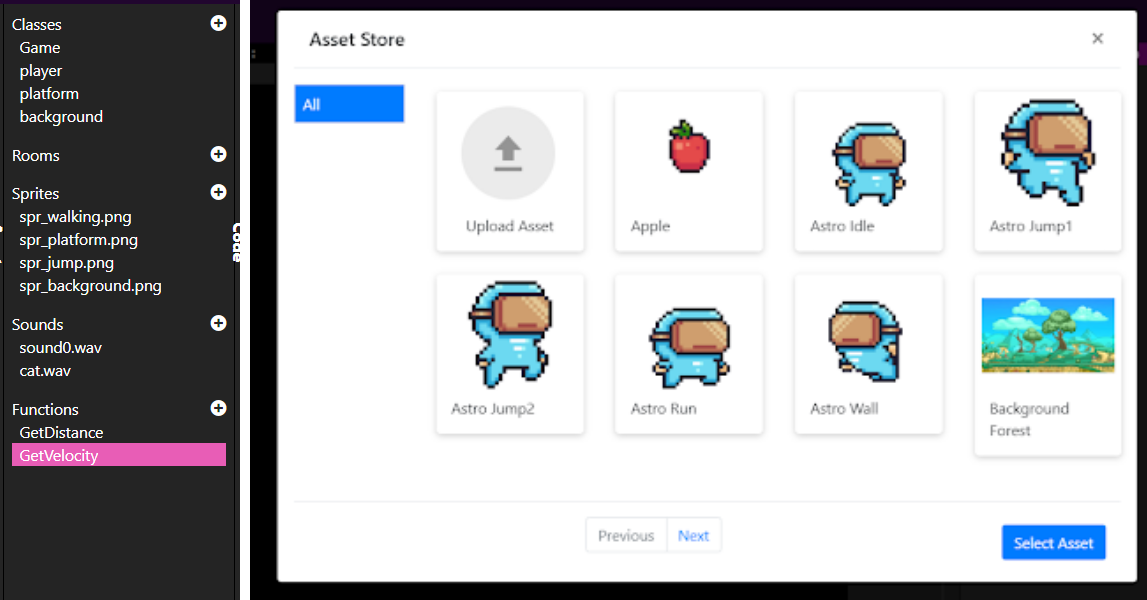
Every PixelPad2D editor has a panel titled Assets.
An Asset is any piece of information you put in your project,
examples are Classes, Rooms, Sprites, Sounds or functions.
Classes
Classes are scripts in your project that are attached to an Object.
However this also includes a class called “Game”. Every script
inside of classes contains a Start & Loop. Start runs when the
script “starts” while loop runs many times per second while the
object is active. To make a class that isn’t attached to an Object,
simply create it in the functions section of the assets. For more
information check out the Game section and the Objects section in
the documentation.
Rooms
In PixelPAD, rooms are where your project takes place. A room is defined
by a room script, which is a Python program whose main purpose is to
create and connect objects. You can think of a room as a "scene": a
collection of objects working together to present a specific scenario
to the player. There can only be one room active at a time. See the
Rooms section in the documentation for more.
Sprites
A sprite is a two-dimensional bitmap or image most often in a 2D project
Sounds
Sound assets for your project. Can use mp3, midi, and wav files.
Functions
A function is code that we need to use often, and since we need to use it often
we can put it in here and use it from any other script in our project. Functions created here are created
outside the loop, and are instantiated before any other code. You can even create Python classes here.
Asset Library
The asset library is accessed by clicking on the plus (+) button within the assets panel for sprites and sounds. The asset library has
free to use sprites you can use for your application. You can also upload your own assets by clicking the upload icon within the library.